BellsEbuth
by Alan ViSTa
System :
Win32
Win64
OSX
Format :
VST
AU
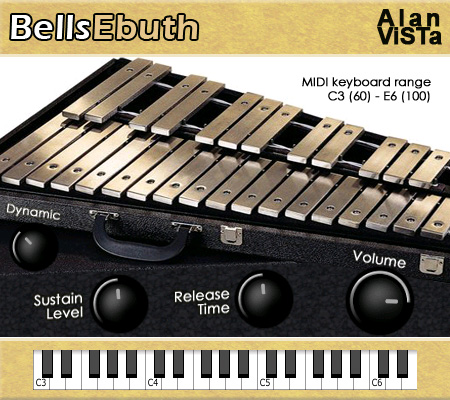
BellsEbuth is a sampled orchestral bells (modern glockenspiel).
It contains 40 stereo samples from the University of Iowa Electronic Music Studios public domain library.
Samples are gently spread in stereo through the keyboard.
It contains 40 stereo samples from the University of Iowa Electronic Music Studios public domain library.
Samples are gently spread in stereo through the keyboard.
- 40 stereo 24 bit samples.
- Release time.
- Sustain level.
- Amplitude dynamic range control.
- Main volume.
Johnkeys22
(5/5)
Nov 30 2025
This is a perfect job. I cannot thank you enough!!
Philipp
(4/5)
Sep 09 2023
Cool plugin but how does it come that evrytime I trie to use it my fl studio crashes ? does anyone have a solution?
Will
Aug 24 2023
Hello! I am so lost I've downloaded the VSt and Au put them in my plug-in folders VSt under VSt folder and Au under the Components folder but they are not showing up in my DAW (abeleton). Using a macbook pro running on Monterey. Any help would be huge!
too late
Jan 05 2026
Just drag the dll in the instrumental list in song editor
Tuningprofi
(5/5)
Mar 09 2022
Thanks, very very cool!
Joe
Feb 24 2022
How do you install this in Protools?
Tacocatone
Dec 23 2021
Whenever I use it it says "Can't find any instruments"
zxnc
Jul 26 2023
You prob didnt drag the instruments folder with the mse sounds in ur vst thing
Blackhood
(5/5)
Oct 17 2020
Thanks you for this awesome plugin
Felix
Aug 29 2020
Hi! Nice vst! I was on High Sierra, it worked perfectly well. I moved to Catalina and the vst didn't work anymore (it said "impossible to open "BellsEbuth.vst" because the developer can't be verified"). Do you have any idea why this happened and how to solve the problem? Thanks!
Chris
Jan 15 2021
This worked for me:
https://www.imore.com/how-open-apps-anywhere-macos-catalina-and-mojave
Gabriel
(3/5)
Apr 06 2020
Hi Alan, I think your vst is really amazing work and I'm including it as an instrument for a composition that I'm working on that I will eventually sell. What is your policy on this kind of thing? I will credit you of course.
Alan
Apr 06 2020
Free to use all the way, please go head. Thanks
Ally Hellkiller
Feb 02 2020
How do I set the outputs so they play midi files in Reaper?
Basslover101
(3/5)
Sept 04 2019
Shame it doesn't have anything before C4.
Anonymous
Jul 28 2019
Put both files into my VST folder in FL Studio, but when I click on the vst in the application, it says "direction is empty" and won't do anything.
Evil Edna
Apr 25 2022
LOL. Use a proper DAW
James
Dec 19 2022
LOL FL studio is a DAW:)
Melvin
Jul 27 2019
antivirus software, webroot says that this plugin is spyware, is this true?
Alan
Jul 27 2019
Fuck no!
Damon Tattersfield
(5/5)
Apr 15 2019
I really like it. It sounds authentic and I would recommend you to get it. However I would like to know if I can use this VST for commercial use, like if I can make a song using the VST, and then upload the song for money? Thanks! Also, for anyone reading this, and considering downloading it, when you extract the zipped folder, there will be two files. Drop both of those into your VST file directory.
someone
Sept 15 2019
No offence dude but thank you for this. when a file comes with multiple files i.. dont know what to do
ds
Mar 13 2019
Why does it say no instruments found ?
Anonymous
Mar 13 2019
Because you have to copy the whole content from the zip file, just like it is.
Chris
Jan 18 2019
Amazing Sound
Mark
Jan 05 2019
Hi! I have successfully installed it. But is shows, "cannot find instrument". Somebody help?
Damon Tattersfield
Apr 15 2019
When you extract the folder you download, there will be two files from that folder. One is a dll file, and one is another folder. Drop both of those into your VST folder, and load it up. Hope that helps :)
Mark
Jan 03 2019
How do I launch this on FL studio? Kontakt doesn't scan this as a plug in. Somebody help?
Anonymous
Jul 14 2019
drop it in your flplugins folder .. where all the rest of your vsts are
bluec
Dec 25 2018
Beautiful
Thor
(5/5)
Dec 02 2017
All the VST by Allan Vista are very finely produced. The sound is warm, precise, well, his VST are great and inspiring. Thank you for everything !
Patryk
Sept 11 2017
Why it doesnt work with studio one? :(
TA-AT
Jan 06 2019
Hey all Alan Vista works with Studio One, you have to put the WHOLE folder of both files into the vstplugins folder.
Mark (FlyingScooter)
(4/5)
Jun 17 2017
Very clean and pretty sound! My wife will love this one. Thanks!!!
Anonymous
(5/5)
Mar 10 2017
Beautiful sound. A Glockenspiel VST is an essential to any DAW. Just try it, what have you got to lose?
Bob
Feb 25 2017
Doesn't work with Ableton Live 9 lite :(
Mike Lacey
(5/5)
Sept 27 2016
Sounds great, easy to use.
RC
Sept 10 2016
How can I install it? I copied the files into C:/Programs64/VstPlugins but i cannot find it in the daw (Cubase 5.1)
Brixton Emollient
(5/5)
Jul 05 2016
Wow, very good service to provide this! Love it!
keyvan k
Apr 07 2016
Your vst is ok, thanks.
GlocknSpells
(5/5)
Jan 02 2016
I love the sounds! Very Clear! and it's free for use thank you!
killer_bee.vst
(3/5)
Mar 25 2015
To be honest with you, I wasn't really paying attention to the sound. What I like are those shiny bar things in the middle. Who cares about what it sounds like when that's what it looks like, am I right?
jeremi
Feb 05 2015
How do we install mse. files into the plugin ? i got the dll. file but when lunched into a DAW there is no sound
Anonymous
Feb 05 2015
Unzip and copy all files exactly the way it is organized.
Jason
Mar 12 2015
I copied everything exactly as they are organized and am having a similar issue. I can get sound by clicking on the keys on the FX track window, but when I try and open up my DAW's MIDI keyboard and program parts in, there is no sound. I'm using Reaper. Anyone else have this problem?
Anonymous
Mar 12 2015
Are you sure your midi channel is set to 1 ? Did you try to play all octaves on your keyboard ?
Jason
May 10 2016
Well, that's not the problem. There's absolutely no sound anywhere outside the VST window. I put down notes for it, and there's no sound at all. I'm using FL Studio 12, by the way.
Trey
May 30 2020
I have the same problem here. The sound is great but when I use my midi keyboard or another DAW there is no sound. I only use FL studio for VSTs for Cakewalk.
Catherine
(4/5)
Dec 13 2014
Thank you very much, so nice to share it
WangTang
Dec 09 2014
Many THANX for this beauty !!
QUIYENGA QBF398INC
Nov 11 2014
I APPRECIATES
Stefan
(5/5)
Oct 30 2014
Awesome, realistic sound!
