4 Band Shifter
by Bitterspring
Show more
No website
System :
Win32
Format :
VST
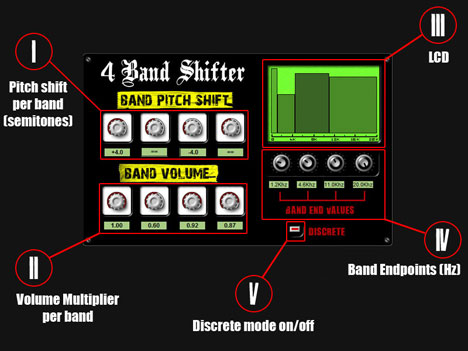
4 Band Shifter is a VST Plugin that is able to scale (shift) independently the pitch of 4 adjacent, user-definable frequency bands.
When it is turned off, knobs behave in a continuos way, meaning that you can shift up or down by fractions of semitone, obtaining a "slide" effect on pitch change.
- Pitch knobs
- Volume knobs
- LCD Display
- Band Endpoint knobs
- Discrete/Continuous switch
When it is turned off, knobs behave in a continuos way, meaning that you can shift up or down by fractions of semitone, obtaining a "slide" effect on pitch change.
Downloads
Win 32 VST
(0.8 Mb)
... Lacika?
(5/5)
Mar 23 2025
is trippy
Max
Jul 23 2023
Doesn't work for me on Win10 with n-Track (I tried to put the other file in the SysWOW64 folder but still doesn't work). Would be nice to correct this as it seems to be a nice plugin
offthesky
(4/5)
Mar 29 2022
Seems great for sound designs and spectral type effects. Only rants: it's mono, and you have to copy the fftw3.dll to the SysWOW64 folder, as others have mentioned, in order to get this to show up in reaper.
Anonymous
(5/5)
Apr 15 2018
I have Windows7 64bit so, I got it to work by copying the fftw3.dll to the SysWOW64 folder. 8-)
T[ERROR]
Dec 16 2017
I can't use this VST :( Keeps on saying that something is missing from my computer?
NotAnotherSuitGuy
Apr 16 2021
The solution above worked for me: under Windows (7) 64 bits, I’ve copied the fftw3.dll to the SysWOW64 folder. Maybe worth a try? Good luck!
Luis Tamayo Zegers
(3/5)
Oct 21 2015
Good but forcing a frequency band 12 semitones up makes sound noisy. Interesting to apply this effect to a second track of a single instrument.
JayAud aka DeeJu
Aug 10 2017
Hey man... What type of beats do you make? I would like to get some ideas from you if we happen to be in the same line
Well Duh
Apr 28 2018
Maybe it's because you're shifting your signal up an octave?
Luis Tamayo Zegers
Oct 20 2015
Where do we must put the two dll included?
Apparently, one of them is the VST effect and the other seems to be a FFT library. I couldn't test it.
Anonymous
Oct 20 2015
Both dll have to be in the same vst plugin folder, this plugin needs them togheter to work.
Luis Tamayo Zegers
Oct 20 2015
I've already done that. Actually, all the VST4FREE effect plugins are in the same directory, namely "D:/./../VST". That's needed in order to make use of them at the same time by the software. The main problem is that the software "reads" each dll as if they were two different vst effects. So, it never takes the two dll as a whole. Anyway, thanks for the answer.
Anonymous
Oct 20 2015
If you try to load the bernspitch.dll, nothing happens ?
Luis Tamayo Zegers
Oct 20 2015
The software (mounted on Win XP) shows two windows when you try to load bernspitch, selecting it thru the the list of effects: The first is "Error at initiate the program because couldn't find fftw3.dll" and afterwards another that simply says"Cannot load VST Plugin bernspitch". I think that maybe the bernspitch dll is calling fftw3.dll not in a relative way. I mean the calling could be coded in such a way that fftw3.dll is in an specific folder. In fact if you look at the dates of the dll files are quite different. Maybe fft3w.dll should be located in a system folder. I don't have tried that yet.
Anonymous
Oct 20 2015
The test I did was successful with the 2 dll's in the same folder, but if I try to open the main one with the lib aside, it won't show. I tried with XP too. I guess your DAW can't manage this plugin... Can't help more, sorry.
Luis Tamayo Zegers
Oct 20 2015
Maybe you're right and my DAW can't manage this plugin. It could be the first time. Nevertheless, most of the vst4free plugins only have one dll. I found some info about fftw3.dll at this website: http://www.dll4free.com/fftw3.dll.html . There is an explanation about where that library should be located and how to add a register key for it. In the Win XP case, should be at Winodws/System32 as suspected. I'll try it later. Thanks a lot and if it works I'll make you know.
Luis Tamayo Zegers
Oct 20 2015
Now it works without a problem !
muzikman
(0/5)
Jul 24 2015
Doesn't work in VSTHost.
cocostro
Apr 02 2015
To have it working on fruityloops you have to place the other file in the main FruityLoops folder.
Annika
Jul 27 2014
Doesn't work in Fruityloops :/
Champignon
(4/5)
Dec 28 2010
Great! ;)
